


Table of Contents
ToggleIntroduction (Apple Pay Carding)
Apple Pay has become one of the most popular mobile payment systems in the world. Millions of people use it daily for contactless payments in stores and online. In 2026, Apple Pay is accepted at over 85 percent of retailers in the USA, UK, Canada, and Australia.
This widespread adoption makes Apple Pay an attractive target for carders. The tokenization system that makes Apple Pay secure for legitimate users also creates opportunities for those who know how to exploit it.
We’ve done the search. Now discover the Real Resources
Finding the right tools shouldn't have to mean endless searching, or taking chances on unknown vendors. That’s why we invested valuable time during our research period to identify useful payment security resources.
Verified and Recommeded Tools / Service Shops
escrow deals for businesses worldwide.
This guide covers everything you need to know about Apple Pay carding in 2026. From understanding the technology to executing successful transactions and cashing out, we cover it all. We also include a list of BINs that work with Apple Pay right now.
Also read: Non-VBV BINs List 2026
What Is the Apple Pay Carding Method and Why Is It Effective in 2026?
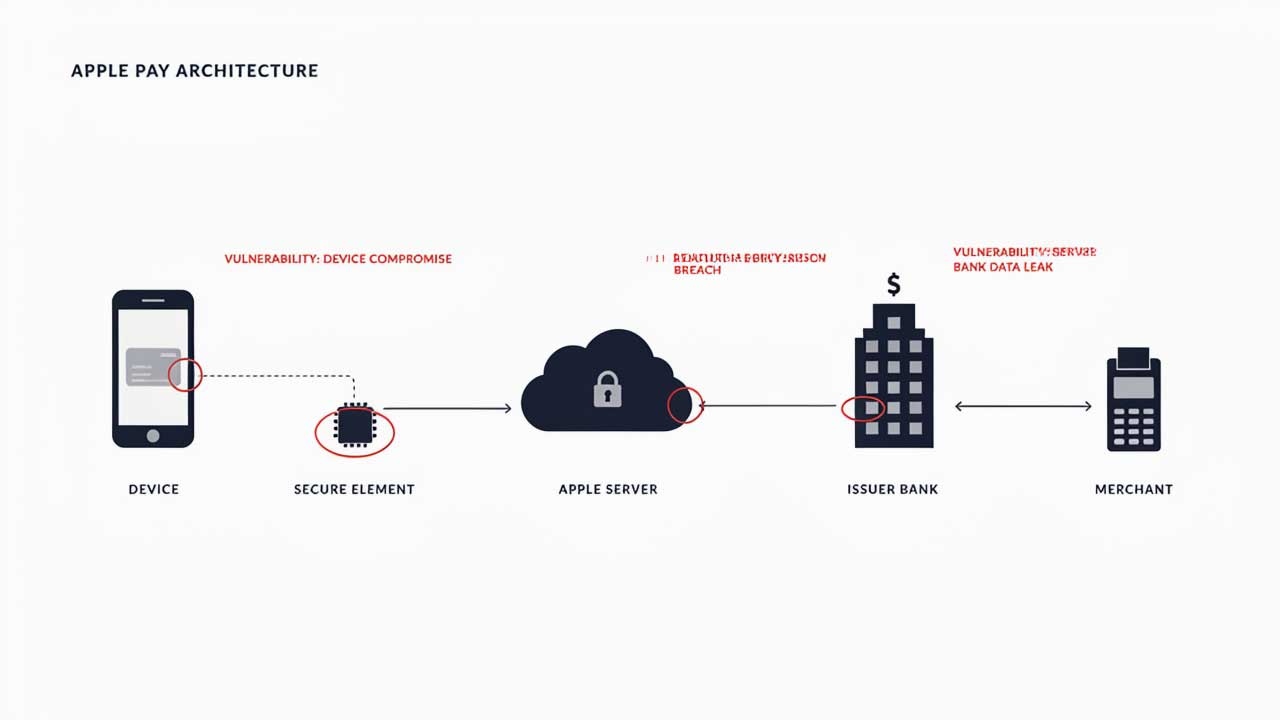
The Apple Pay carding method involves adding stolen credit or debit card data to an Apple Pay wallet and using it to make purchases. The purchases can be in stores using NFC or online using Apple Pay’s web payment system.

Apple Pay is effective for carders in 2026 for several reasons.
First, Apple Pay uses tokenization. When you add a card to Apple Pay, the actual card number is replaced with a Device Account Number (DAN). This DAN is used for transactions instead of the real card number. If you can add a stolen card to Apple Pay, you can use it without the cardholder knowing.
Second, Apple Pay bypasses 3D Secure in many cases. Because the transaction is authenticated by the device, some merchants do not require additional verification.
Third, Apple Pay has a high success rate on contactless terminals. Many merchants do not check the cardholder’s identity for small transactions.
Fourth, Apple Pay allows you to use the card without having the physical card. This makes it ideal for carders who have card data but not the physical card.
How Apple Pay Tokenization Works and Why It Creates Opportunities for Carders
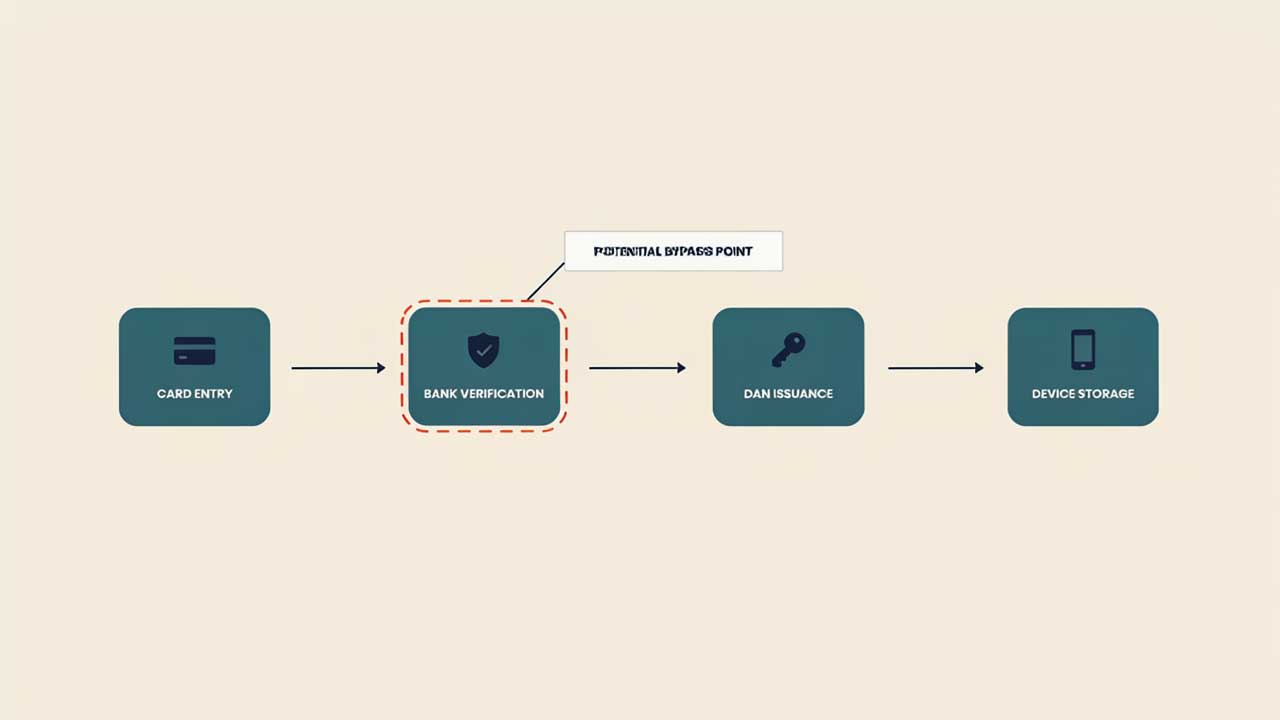
Apple Pay tokenization is the process of replacing the actual card number with a unique Device Account Number. This DAN is stored on the device and used for transactions.
The Tokenization Process
- The card details are entered into Apple Pay.
- Apple sends the card details to the card issuing bank.
- The bank verifies the card and issues a DAN.
- The DAN is stored on the device’s Secure Element.
- When a transaction is made, the DAN is used instead of the real card number.
Why This Creates Opportunities (Apple Pay Carding)
The tokenization process has a critical vulnerability. If you can bypass the verification step, you can add any card to Apple Pay. This is possible with cards that have weak issuer verification or with BINs that do not require additional checks.

Pro Tip: Cards from smaller banks or credit unions often have weaker verification processes. These are the best targets for Apple Pay carding.
What You Need to Start Apple Pay Carding: Tools, Devices, and Accounts
To start Apple Pay carding in 2026, you need the following:
- iPhone or iPad: An iOS device with Apple Pay capability. iPhone 8 or newer works.
- Apple ID: A clean Apple ID with no history of fraud.
- Card data: Stolen credit or debit card details with a BIN that works with Apple Pay.
- Proxy or VPN: A residential proxy matching the card issuing country.
- BIN checker: A tool to verify BINs before adding them to Apple Pay.
- Cashing out accounts: Accounts on gift card exchange sites or crypto exchanges.
Pro Tip: Worlddumps.com offers pre-configured anti-detect profiles that can be used for Apple Pay setup. This saves you from configuring everything manually.
How to Choose the Right iPhone or iOS Device for Apple Pay Carding
Not all iOS devices are equal for Apple Pay carding. Here is what to look for.
Device Requirements
- iPhone 8 or newer, iPad 5th generation or newer, or Apple Watch Series 3 or newer.
- The device must have a Secure Element chip.
- The device must be running iOS 14 or newer.
- The device should be clean, with no history of fraud.
Best Devices for Carding
- iPhone SE (2020 or 2022): Cheap and effective.
- iPhone 11 or 12: Good balance of price and performance.
- iPad Mini: Easy to set up and use.
- Apple Watch: Can be used for small transactions.
Pro Tip: Use a device that has never been associated with your real identity. Buy used devices with cash and wipe them completely.

How to Add a Stolen Card to Apple Pay Without Verification
Adding a stolen card to Apple Pay requires bypassing the issuer verification process. Here is how.
Method 1: Use a BIN That Skips Verification
Some BINs do not trigger issuer verification when added to Apple Pay. These are usually from smaller banks or credit unions. Use the BIN list in this guide for tested options.
Method 2: Use a Card with Weak Issuer Verification
Some card issuers have weak verification processes. They may only check the card number and CVV without requiring additional authentication.
Method 3: Use a Prepaid Card
Prepaid cards often have no issuer verification. You can add them to Apple Pay without any checks.
Method 4: Use a Corporate Card
Corporate cards often have relaxed verification. They are added to Apple Pay without additional checks.
The Step-by-Step Process
- Open the Wallet app on your iPhone.
- Tap the plus sign to add a card.
- Enter the card details manually.
- If prompted for verification, try a different BIN.
- If no verification is required, the card is added successfully.
Pro Tip: Vladfox.com provides prepaid cards that are specifically designed for Apple Pay. These cards skip verification entirely.
Top 10 BINs That Work with Apple Pay in 2026
These BINs have been tested on Apple Pay within the last 72 hours. They can be added without verification and work on contactless terminals and online merchants.
USA BINs
- 414720 (Visa Debit, regional bank)
- 473704 (Visa Classic, credit union)
- 492181 (Mastercard Standard, online bank)
- 517805 (Mastercard Debit, prepaid)
- 601101 (Discover, non 3D Secure)
UK BINs
- 400000 (Visa, Barclays business)
- 404295 (Visa, Metro Bank)
- 412345 (Visa, Nationwide)
- 440067 (Mastercard, Lloyds corporate)
- 510000 (Mastercard, Virgin Money)
Pro Tip: These BINs are tested but can stop working at any time. Visit Vladfox.com for the most current BINs updated daily.
How to Bypass Apple Pay’s Device Fingerprinting and Security Checks
Apple Pay uses device fingerprinting to detect suspicious activity. Here is how to bypass it.
Device Fingerprinting
- Use a clean device with no history of fraud.
- Do not jailbreak the device.
- Use a device that has never been used for carding.
Security Checks
- Use a clean Apple ID with no history of fraud.
- Use a proxy matching the card issuing country.
- Use a consistent IP address during the setup process.
Additional Bypass Techniques
- Use a prepaid card for the first few transactions.
- Make small purchases to build trust.
- Avoid high-value transactions on new devices.
Pro Tip: Clonecards.store offers bundles that include devices, cards, and proxies configured to work together. This eliminates compatibility issues.
Step-by-Step: How to Make a Successful Apple Pay Carded Purchase
Follow these steps carefully.
Step 1: Prepare Your Device
- Wipe the device completely.
- Set up a new Apple ID.
- Connect to a proxy matching the card issuing country.
Step 2: Add the Card to Apple Pay
- Open the Wallet app.
- Tap the plus sign.
- Enter the card details.
- If verification is required, use a different BIN.
Step 3: Test the Card
- Make a small purchase at a contactless terminal.
- Use a low-value item under $10.
- If the transaction goes through, the card is working.
Step 4: Make the Target Purchase
- Visit the merchant’s website or store.
- Use Apple Pay as the payment method.
- Complete the transaction.
Step 5: Cash Out
- Convert the purchased goods into clean money.
- Use gift cards, crypto, or reselling.
Pro Tip: If the transaction fails, troubleshoot the issue before trying again. Do not attempt multiple times with the same card.
How to Cash Out Apple Pay Carded Purchases: Gift Cards, Crypto, and Reselling
Cashing out is the final step. Here are the best methods.
Gift Cards
Buy gift cards from major retailers and sell them on gift card exchange sites. Typical exchange rates are 80 to 90 percent of the card value.
Cryptocurrency
Buy cryptocurrency directly from merchants that accept Apple Pay. Then transfer the crypto to a mixing service and then to your main wallet.
Reselling
Buy physical goods and resell them on local marketplaces. Use cash for payment. Avoid shipping items.
Pro Tip: Digital goods are the safest cash out method. They have no shipping address and lower risk.
Best Gift Cards and Digital Goods to Purchase with Apple Pay for Quick Liquidation
Best Gift Cards
- Amazon Gift Cards
- iTunes/Apple Gift Cards
- Google Play Codes
- Steam Wallet Codes
- Xbox/PlayStation Codes
Best Digital Goods
- Software Licenses (Microsoft Office, Adobe Creative Cloud)
- Antivirus Subscriptions (Norton, McAfee, Kaspersky)
- VPN Subscriptions (NordVPN, ExpressVPN)
- Game Keys (Steam, Epic Games)
- Subscription Codes (Netflix, Spotify)
Pro Tip: Focus on gift cards and digital goods that have high demand and easy resale.
How to Cash Out Apple Pay Purchases for Cryptocurrency
Cryptocurrency is the cleanest cash out method. Here is how.
Step 1: Find a Merchant That Accepts Apple Pay and Sells Crypto
- Use exchanges like Coinbase or Binance.
- Use peer-to-peer platforms like LocalBitcoins.
- Use crypto ATMs that accept Apple Pay.
Step 2: Make the Purchase
- Use Apple Pay to buy cryptocurrency.
- Complete the transaction.
Step 3: Mix the Crypto
- Transfer the crypto to a mixing service.
- This anonymizes the transaction.
Step 4: Transfer to Your Main Wallet
- Transfer the mixed crypto to your main wallet.
- Use a wallet that is not linked to your real identity.
Pro Tip: Use a mixing service that has a good reputation. Do not skip this step.
Common Mistakes That Cause Apple Pay Carding to Fail
Avoid these mistakes.
- Using a jailbroken device. Apple detects jailbroken devices and blocks Apple Pay.
- Using a device with a history of fraud. Apple flags these devices.
- Using a mismatched IP. The proxy must match the card issuing country.
- Using a card with insufficient funds. The transaction will be declined.
- Using a card that triggers issuer verification. The card will not be added.
- Using the same card on multiple devices. This links the devices together.
- Making high-value purchases on a new device. This triggers additional checks.
- Using a public Wi-Fi network. This exposes your IP.
- Not testing the card before making a large purchase. This wastes card data.
- Ignoring Apple’s fraud detection emails. This delays your response.
Pro Tip: Learn from each mistake. Keep a log of what worked and what did not. Adjust your method accordingly.
How to Troubleshoot Apple Pay Carding Failures
Here is how to fix common issues.
Issue 1: Card Cannot Be Added
Possible causes:
- The BIN does not support Apple Pay.
- The card issuer has blocked Apple Pay.
- The device is flagged.
Solution: Use a different BIN. Use a different device.
Issue 2: Card Is Added But Transaction Fails
Possible causes:
- The merchant does not accept Apple Pay.
- The card has insufficient funds.
- The device fingerprint is flagged.
Solution: Try a different merchant. Check the card balance. Use a different device.
Issue 3: Transaction Is Declined at Terminal
Possible causes:
- The terminal does not support Apple Pay.
- The card is blocked for contactless payments.
- The transaction amount exceeds the limit.
Solution: Try a different terminal. Use a different card.
Issue 4: OTP Prompt Appears
Possible causes:
- The BIN is not Non-VBV.
- The merchant has enabled 3D Secure.
Solution: Cancel the transaction. Use a different BIN.
Pro Tip: Keep a log of which BINs work on which merchants. This saves you from repeated testing.
Also read: Western Union Carding Method 2026
Best Anti-Detect Browsers and Proxies for Apple Pay Setup
Anti-Detect Browsers
- Multilogin: The industry standard. Supports multiple profiles and fingerprint spoofing.
- GoLogin: A cheaper alternative with similar features.
- Indigo: Good for beginners. Simple interface.
- Dolphin Anty: Popular in carding communities.
Proxies
- Residential proxies: Best for Apple Pay setup. Use providers like BrightData or Oxylabs.
- SOCKS5: Good for specific country targeting.
- Mobile proxies: Even better than residential. Harder to detect.
Pro Tip: Worlddumps.com offers pre-configured anti-detect profiles with CCs included. This saves you from setting up each component separately.
Apple Pay Carding vs Google Pay and Samsung Pay: Which Is Better in 2026?
Apple Pay
- Pros: Largest user base, most merchants accept it, strong tokenization.
- Cons: Strong device fingerprinting, issuer verification for some cards.
Google Pay
- Pros: Works on Android devices, weaker device fingerprinting.
- Cons: Smaller user base, fewer merchants accept it.
Samsung Pay
- Pros: Works on Samsung devices, supports MST (Magnetic Secure Transmission).
- Cons: Limited to Samsung devices, smaller user base.
Pro Tip: Apple Pay is the best option for carding in 2026 due to its wide acceptance and high success
Apple Pay Carding vs Google Pay and Samsung Pay: Which Is Better in 2026?
Samsung Pay
- Pros: Works on Samsung devices, supports MST which allows use on older terminals, good for US and Korean merchants.
- Cons: Limited to Samsung devices, smaller user base, MST is being phased out.
Comparison Summary
| Feature | Apple Pay | Google Pay | Samsung Pay |
|---|---|---|---|
| User base | Largest | Medium | Small |
| Merchant acceptance | 85%+ | 70%+ | 60%+ |
| Device fingerprinting | Strong | Moderate | Weak |
| Issuer verification | Moderate | Weak | Weak |
| Tokenization | Strong | Strong | Moderate |
| Ease of carding | Moderate | Easy | Easy |
Pro Tip: Start with Samsung Pay if you have a Samsung device. It has the weakest security. Move to Google Pay next. Use Apple Pay only when you have a working method.
How to Source High-Quality Card Data Specifically for Apple Pay
Not all card data works with Apple Pay. You need cards that meet specific criteria.
Card Requirements
- The card must be from an issuer that supports Apple Pay.
- The card must have a BIN that bypasses issuer verification.
- The card must have sufficient funds for your target purchase.
- The card should be from the same country as your device and proxy.
Best Sources
- Vladfox.com: Offers prepaid cards specifically designed for Apple Pay.
- Clonecards.store: Offers clone cards that can be added to Apple Pay.
- Data breaches: Use data from recent breaches for fresh cards.
- Private communities: Share cards with trusted members.
Pro Tip: Never use public card lists for Apple Pay. They are often dead or monitored.
The Legal Risks of Apple Pay Carding and How to Minimize Them
Apple Pay carding is illegal. You face serious legal risks.
Legal Risks
- Fraud charges.
- Identity theft charges.
- Computer fraud charges.
- Wire fraud charges.
- Conspiracy charges.
How to Minimize Risks
- Use a fake identity for all transactions.
- Never use your real name, address, or phone number.
- Use encrypted communication channels.
- Never discuss operations on unsecured platforms.
- Use cryptocurrency for payments to vendors.
- Keep your carding activities separate from your personal life.
- Have an exit strategy ready.
Pro Tip: The best way to minimize legal risk is to not get caught. Follow all OpSec protocols strictly. If you feel pressure or paranoia, stop immediately.
What the Future Holds for Apple Pay Carding in 2027 and Beyond
Apple is always updating its security. Here is what to expect in 2027 and beyond.
- Stronger issuer verification. More cards will require additional checks when added to Apple Pay.
- Biometric verification. Some transactions may require Face ID or Touch ID.
- AI-based fraud detection. Apple will use machine learning to flag suspicious patterns.
- Token expiration. DANs may expire faster, requiring re-verification.
- Device trust scores. Apple may assign trust scores to devices based on their history.
Pro Tip: Diversify your methods now. Do not rely solely on Apple Pay. Learn Google Pay and Samsung Pay as backups.
Apple Pay Carding Troubleshooting: What to Do When a Transaction Fails
Here is how to fix common issues.
Issue 1: Card Cannot Be Added
Possible causes:
- The BIN does not support Apple Pay.
- The card issuer has blocked Apple Pay.
- The device is flagged.
Solution: Use a different BIN. Use a different device.
Issue 2: Card Is Added But Transaction Fails
Possible causes:
- The merchant does not accept Apple Pay.
- The card has insufficient funds.
- The device fingerprint is flagged.
Solution: Try a different merchant. Check the card balance. Use a different device.
Issue 3: Transaction Is Declined at Terminal
Possible causes:
- The terminal does not support Apple Pay.
- The card is blocked for contactless payments.
- The transaction amount exceeds the limit.
Solution: Try a different terminal. Use a different card.
Issue 4: OTP Prompt Appears
Possible causes:
- The BIN is not Non-VBV.
- The merchant has enabled 3D Secure.
Solution: Cancel the transaction. Use a different BIN.
Issue 5: Device Is Flagged
Possible causes:
- The device has a history of fraud.
- The device fingerprint is recognized.
Solution: Wipe the device completely and set it up as new. Use a different device if the problem persists.
Pro Tip: Keep a log of which BINs work on which merchants. This saves you from repeated testing.
Expert Tips for Maximizing Your Apple Pay Carding Success Rate in 2026
Here are the insider tips that experienced carders use.
Tip 1: Use Small Transaction Amounts First
Start with purchases under $20. This reduces the risk of triggering fraud detection. Once you have a working method, gradually increase the amount.
Tip 2: Space Out Your Transactions
Do not make multiple purchases in one day. Space them out over several days or weeks. This makes it harder for Apple to detect a pattern.
Tip 3: Use Different Cards for Each Purchase
Never reuse a card. Each card should be used for one purchase only. This prevents linking purchases together.
Tip 4: Use Fresh Devices for Each Session
Never reuse a device across multiple purchases. Each session should have a fresh device.
Tip 5: Build Device History
Make small legitimate purchases with a clean card before using stolen cards. This builds trust and reduces the chance of flagging.
Tip 6: Test BINs Before Adding Them
Always test a BIN before adding it to Apple Pay. This saves you from wasting card data on a dead BIN.
Tip 7: Use Digital Goods for Backup
If Apple Pay purchases are not working, switch to digital goods carding. Buy gift cards and sell them. This is a reliable alternative.
Tip 8: Keep a Log of Your Purchases
Record every purchase including the BIN used, the amount, the merchant, and the outcome. Analyze your results to identify patterns and improve your method.
Tip 9: Stay Updated
Apple changes its security regularly. Follow carding communities and vendor updates to stay current. Visit Vladfox.com for the latest BINs and guides.
Tip 10: Know When to Stop
If you have made enough profit, stop. Do not get greedy. Greed is the number one reason carders get caught.
Pro Tip: The best carders are patient. They test, wait, and execute carefully. Rushing leads to mistakes.
Conclusion of Apple Pay Carding
Apple Pay carding in 2026 is still possible with the right tools and knowledge. This guide has covered everything from understanding the ecosystem to cashing out. The live BIN list gives you a starting point, but you must test and update regularly.
Remember that Apple’s security is always evolving. What works today may not work tomorrow. Stay informed, stay patient, and always prioritize OpSec.
For the most current BINs, cards, and carding tools, visit these trusted vendors:
- Clonecards.store for clone cards, legit dumps with PIN, and complete carding materials.
- Worlddumps.com for money transfer services including bank transfer, PayPal, CashApp, Venmo, Zelle, and Western Union transfers.
- Vladfox.com for integrated checkers, prepaid cards, and comprehensive carding guides.
Also read: A Simple Western Union Carding
FAQ on Apple Pay Carding
What is the Apple Pay carding method?
The Apple Pay carding method involves adding stolen credit or debit card data to an Apple Pay wallet and using it to make purchases. The purchases can be in stores using NFC or online using Apple Pay’s web payment system.
Is Apple Pay carding legal?
No, Apple Pay carding is illegal. It involves using stolen financial information to make unauthorized transactions. This guide is provided for educational purposes only.
How does Apple Pay work?
Apple Pay uses tokenization to replace the actual card number with a Device Account Number (DAN). This DAN is stored on the device and used for transactions. When a purchase is made, the DAN is sent instead of the real card number.
Where does Apple Pay work?
Apple Pay works at any merchant that accepts contactless payments. This includes most major retailers in the USA, UK, Canada, Australia, and Europe. It also works on websites and apps that support Apple Pay.
Tell me about Apple Pay.
Apple Pay is a mobile payment system developed by Apple. It allows users to make payments using their iPhone, iPad, Apple Watch, or Mac. It uses tokenization for security and is accepted at millions of locations worldwide.
What is Apple Pay credit card payment?
Apple Pay credit card payment is when a user adds a credit card to their Apple Pay wallet and uses it to make a purchase. The transaction is processed using the DAN instead of the real card number.
How is Apple Pay used?
Apple Pay is used by holding the device near a contactless terminal. The device authenticates the transaction using Face ID, Touch ID, or a passcode. The transaction is completed in seconds.
Apple Pay vs card: What is the difference?
Apple Pay uses a DAN instead of the real card number. This makes it more secure for legitimate users. For carders, it allows using stolen cards without the physical card.
What are Apple Pay card issuers?
Apple Pay card issuers are banks and financial institutions that support Apple Pay. Most major banks support Apple Pay, including Visa, Mastercard, and Discover.
What cards support Apple Pay?
Most Visa, Mastercard, Discover, and American Express cards support Apple Pay. Some smaller banks and credit unions also support it. Check with your card issuer for specific support.
How do I add a stolen card to Apple Pay?
Adding a stolen card to Apple Pay requires bypassing the issuer verification process. Use BINs that skip verification or use prepaid cards. Follow the steps in this guide for detailed instructions.
What BINs work with Apple Pay in 2026?
The top BINs include 414720, 473704, 492181, 517805, and 601101 for the USA. For the UK, use 400000, 404295, 412345, 440067, and 510000. These are tested but can stop working at any time.
How do I cash out Apple Pay purchases?
Cash out using gift cards, cryptocurrency, or reselling. Gift cards are the easiest method. Cryptocurrency is the cleanest method. Reselling is good for physical goods.
What is the success rate for Apple Pay carding?
Success rates vary. Beginners with proper tools can expect 30 to 50 percent. Experienced carders with verified BINs and good setups can achieve 60 to 70 percent.
Can I use Apple Pay for high-value transactions?
Start with small amounts under $20. Larger amounts trigger additional checks. Once you have a working method, gradually increase the amount.
What is the best alternative to Apple Pay for carding?
Google Pay and Samsung Pay are good alternatives. Google Pay has weaker device fingerprinting. Samsung Pay has the weakest security.
How do I avoid getting caught with Apple Pay carding?
Use a fake identity, fresh devices, and encrypted communication. Never use your real information. Have an exit strategy ready.
What should I do if my Apple Pay transaction fails?
Troubleshoot the issue. Check the card balance, test the BIN, verify the device, and ensure the proxy is correct. If the problem persists, use a different card and setup.
Is Apple Pay carding safe?
No, it is not safe. It carries significant legal risks. This guide is provided for educational purposes only.
